
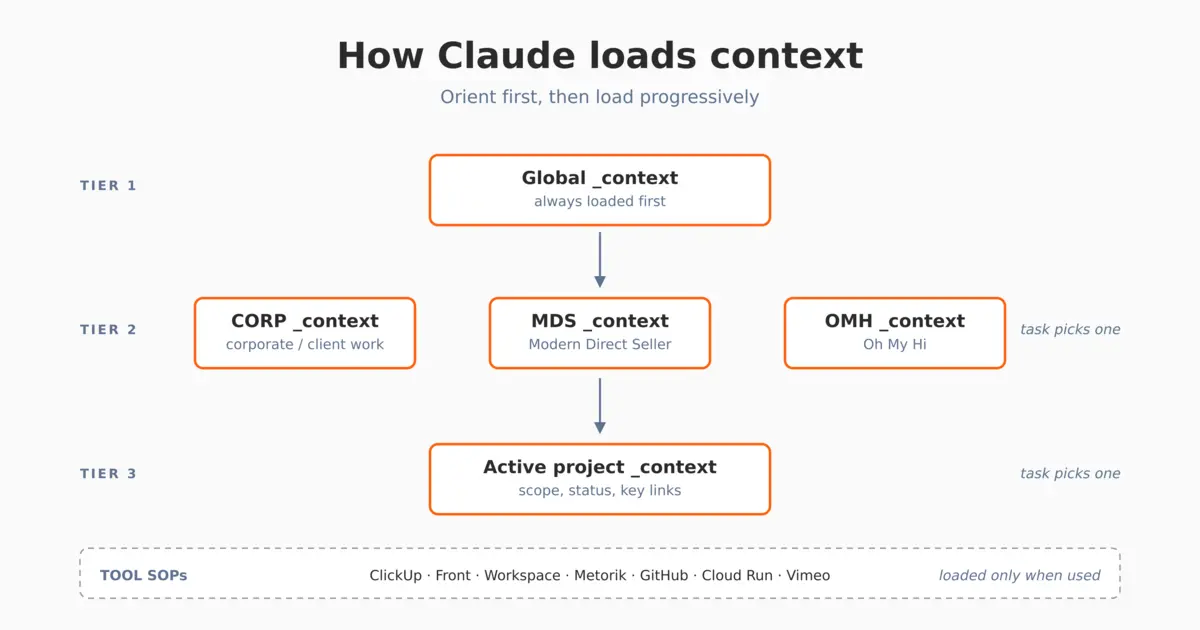
TL;DR: Before I built any of our AI workflows, I had to organize our Google Drive so Claude could read it. The result is a system of tiered _context docs at every level (global, area, project), loaded progressively as the task needs them. Tool SOPs come in just-in-time. Less context turns out to mean better focus, not worse. The team angle is what makes the whole system worth the trouble.
The first week I was serious about using Claude in our business, every session started the same way: tell Claude which brand the task was about, give it the relevant documents, what tools we use, who our customers are, etc. Five minutes of back and forth before any real work. It was obviously going to be an issue in every session forever, and worse once anyone else on the team started using it, unless I fixed it.
The first thing I built when I got serious about AI in our business wasn’t a workflow. It wasn’t a skill. It was a filing system Claude could read.
This post is about that filing system. It’s about how our Google Drive is structured, where the context docs live, and why it’s set up the way it is (the part that took the longest to get right).
What we had before
Years of files across three brands (Modern Direct Seller, Oh My Hi, and our corporate / client work), which means everything you’d expect: inconsistent naming, project folders nested in different places depending on who created them, “active” and “archived” mixed in the same level, brand assets duplicated across folders, and no shared baseline that a new team member (or a new AI session) could read to orient themselves.
It’s a pretty normal small business Drive, and also pretty unworkable if you want an AI agent to act on your stuff.
The structure we landed on
The top level of our shared Drive now looks like this:
Launder Enterprises/
  CORP/
  MDS/
  OMH/
  Resources
    _team/
There are three brand areas at the top level, plus a Resources folder (more on that below) with a _team subfolder for cross-brand templates and onboarding.
Inside each brand area is a consistent four-folder pattern:
Ongoing/      live work organized by department (marketing, ops, dev, etc.)
Projects/     discrete, time-bounded projects, each with its own _context.gdoc
Resources/    brand assets, SOPs, templates
zzArchive/    completed/inactive work (zz prefix sorts it to the bottom)
The naming is deliberate. The _ prefix on _team and _context.gdoc sorts those to the top of any folder listing, so the orientation files are always the first thing you see. The zz prefix on archive folders sorts to the bottom so they don’t clutter normal browsing. It’s a small thing, but it makes it easier to find things every day.
The context docs
This is the part that actually matters. At each meaningful level of the structure there’s a doc named _context.gdoc. It’s not one giant master doc. It’s a small one at every layer.
There are three tiers of context doc:
Global context. A single doc at the Launder Enterprises root that defines the organization (entity, brands, who we are), the Drive structure itself, our working style preferences, file naming conventions, document formatting defaults, and pointers to every area context doc and tool SOP. Think of it as the table of contents for the business.
Area context. One per brand area (MDS, OMH, CORP) plus a private one covering finance, HR, and legal. Each describes that area’s detailed folder structure, active projects, current priorities, and brand-specific quirks. If a task is about MDS, this is the ground truth for what’s in scope.
Project context. There’s one in every active project folder, describing the project’s scope, status, key links, and active assumptions. Each one is short and gets updated as the project moves.
The naming convention (_context everywhere, with the underscore prefix) means a skill or a task can predict exactly where to look for orientation, regardless of which folder it’s working in. The same name appears at every level, so there’s no guessing about where to look.
Why tiered: orient first, then load progressively
Here’s the rule the whole system is built around: orient first, then load progressively. Don’t read everything upfront.
In practice, we load context in three layers:
Tier 1 (canonical): fetch the relevant area’s _context doc at the start of the task. This is the ground truth and takes precedence over other files.
Tier 2 (domain-relevant): only read files directly relevant to the current task. Don’t load speculatively.
Tier 3 (archival): skip zzArchive unless specifically asked.
The reason for layers is that a small business has a lot of docs, and loading all of them every session is wasteful and makes the assistant worse, not better. If Becky asks about an MDS email campaign, Claude reads the global context plus the MDS area context plus the active campaign’s project context. It doesn’t load OMH or CORP or finance docs unless the task crosses into those business areas.
That saves tokens. More importantly, it keeps Claude focused. Less context means better focus on the task at hand. It’s counterintuitive, but it’s kept the quality consistent across chats and tasks.
Tool SOPs as just-in-time context
The same logic applies to tool documentation. Each tool we use heavily (ClickUp, Front, GitHub, Google Workspace, Metorik, Stripe, Vimeo) has its own SOP doc in Resources/SOPs. Each SOP covers how we use that tool, the issues we’ve hit, and any conventions specific to it.
The global context lists all of them with a one-line description and a link. Claude only fetches a tool’s SOP when the task actually needs that tool. There’s no reason to load the Vimeo SOP for a Stripe question.
This was an easy decision once we’d already adopted tiered context for business areas. It’s the same principle, applied to tools.
Why this matters more for a team than for me
If I were the only one using this, the structure would still be useful. The team angle is what makes it mandatory.
A few things change once more than one person is operating with Claude on shared work.
Single source of truth. When Becky updates the MDS brand voice doc, every skill that reads it (and every team member’s session) gets the update on the next run. There’s no drift between team members, and no “wait, which version of the voice guide are you using?” moments. The piece that helps make this happen is the Google Docs MCP, an OAuth-authenticated connector that lets every team member’s Claude account read from (and write to) the same shared Drive content. Without it, “single source of truth” turns back into people pasting context into their own sessions and manually updating shared Google docs by copy/pasting Claude’s outputs.
Onboarding takes minutes, not weeks. A new contractor or team member starts a chat and Claude already knows what we run. They don’t need a one-on-one with me to be productive.
Decisions get documented once. “We don’t run paid ads for OMH right now” lives in the OMH context. Anyone (or anything) reading that file gets the current state. It doesn’t need to be talked about in every ClickUp chat thread or meeting.
The most important rule we keep on this is that only one person updates the global and business area context docs. For now, that’s me. Everyone else can read them, but if context is going to be the source of truth, only one person should update and maintain it. If multiple people are editing the context docs, they could end up bloated or inconsistent.
The drawbacks (because there are some)
The big one is maintenance. Context docs only work if they’re current. Stale context is worse than no context, because it confuses without flagging itself as confused. We try to update the relevant context doc as part of the work that changed it (a project finishes, its context doc closes out; a priority shifts, the area context gets a one-line update) instead of treating context maintenance as its own separate task. The minute it becomes a separate task, it stops happening. This is easy to do because Claude can update the docs for us with the Google Docs MCP we’ve connected.
A few smaller drawbacks:
- The single-editor rule creates a small bottleneck. If I’m out or busy, context docs could be outdated for a short time. They don’t change much so this hasn’t been an issue so far.
- Initial setup is a real time investment, probably a couple days for a business of our size, and more if you’re cleaning up years of Drive content at the same time.
- For a true solo operator with a simple structure, this may be overkill. The benefits scale with team size and project count.
- Claude doesn’t always pull the right context perfectly. Sometimes you have to remind it, tune a skill description, or be more explicit in a prompt.
What this enables
Everything I’m writing about in this category (the daily financial snapshot, the brand-voice skills, the MCP integrations, the support agent we’re building for OMH) sits on top of this foundation. The reason any of those workflows behave consistently is that they don’t have to guess about who we are or where things live. They open the relevant _context doc and start from the same baseline I would.
This initial Drive and context setup was critical and worth the investment up front before trying to establish any workflows or skills because most of what came after was due to getting this right.
I’ll write up the workflows themselves and talk about the MCP connectors in upcoming posts. Subscribe if you want updates.
Leave a Reply