
TL;DR
Symptom: duplicate orders with Woo Blocks; Cause: Nginx Helper purging on comment (order notes) inside checkout; Fix: disable comment/feeds purge; Result: checkout time ~5s, duplicates gone.
Symptom
On our main Oh My Hi site we had a couple customers that were charged twice on new orders (not renewals). In WooCommerce and Stripe we saw two separate orders and two different Payment Intents that were created within seconds of each other. The Stripe logs confirmed there were two different Payment Intents.
We use the WooCommerce Blocks checkout. Our server stack includes the following that are related to this issue:
- Nginx
- FastCGI Page Cache
- Redis Object Cache
The Real Issue
The problem was related to delays in the checkout process introduced by unnecessary automatic cache purges happening due to settings in Nginx Helper plugin.
Checkout would be submitted and then the request sat for ~60 seconds. The browser saw a 504 Gateway Timeout from Cloudflare because Nginx timed out while PHP was still finishing the order. Despite the 504 error, PHP finished the order server-side, but because the browser didn’t get a success response, the pay button would be re-enabled. The customer would then click the pay button again and a second order would go through.
How I Figured it Out
I was able to re-create the slow checkout on staging. I turned on PHP Slow Log, ran a test checkout and looked at the log file. In the log file I could see unexpected calls to the Nginx Helper plugin like below.
[0x00007fb84fc17840] wp_remote_get() /var/www/staging.ohmyhi.com/htdocs/wp-content/plugins/nginx-helper/admin/class-purger.php:492
[0x00007fb84fc17780] do_remote_get() /var/www/staging.ohmyhi.com/htdocs/wp-content/plugins/nginx-helper/admin/class-fastcgi-purger.php:90
[0x00007fb84fc17680] purge_url() /var/www/staging.ohmyhi.com/htdocs/wp-content/plugins/nginx-helper/admin/class-purger.php:728
[0x00007fb84fc17600] _purge_homepage() /var/www/staging.ohmyhi.com/htdocs/wp-content/plugins/nginx-helper/admin/class-purger.php:195
[0x00007fb84fc17530] purge_post() /var/www/staging.ohmyhi.com/htdocs/wp-content/plugins/nginx-helper/admin/class-purger.php:116
[0x00007fb84fc17420] purge_post_on_comment_change() /var/www/staging.ohmyhi.com/htdocs/wp-content/plugins/nginx-helper/admin/class-purger.php:68
[0x00007fb84fc17360] purge_post_on_comment() /var/www/staging.ohmyhi.com/htdocs/wp-includes/class-wp-hook.php:324
Based on that, I looked at the Nginx Helper plugin settings and was able to implement an easy fix.
The Details
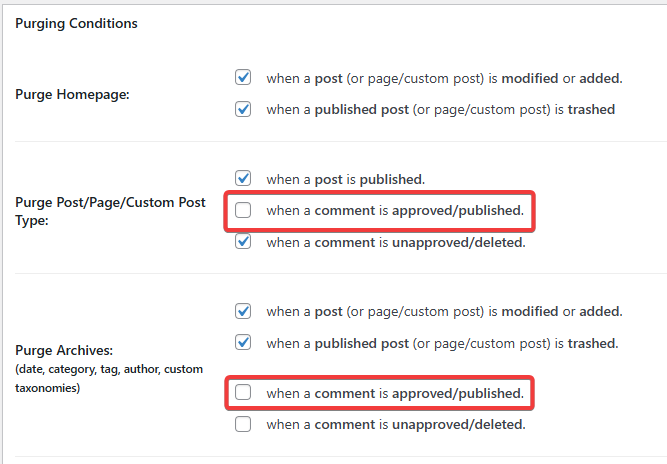
The Nginx Helper function provides a helpful UI to be able to purge the cache from the WordPress admin. It also has settings to enable/disable cache purge when certain events occur such as when a post is published, modified, trashed and when comments are approved/published or unapproved/deleted.
The auto purge on comments being published was the issue here.
WooCommerce stores its order notes as post comments and there are multiple order notes published during the checkout process.
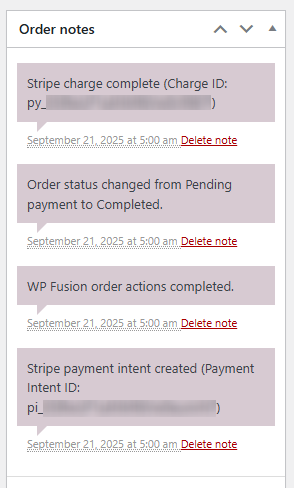
Other plugins that integrate with WooCommerce can also add notes to orders, such as WP Fusion and AffiliateWP which we also use, compounding the problem further. And if you are using WooCommerce Subscriptions like us, the number of comments is almost doubled because there is an order and a subscription having notes added to them.
Because the Nginx Helper setting to enable cache purge after a comment is published was enabled, our site was purging the cache every time a new note was added to an order or subscription.
This slowed down checkout to the point where it could take longer than 60 seconds sometimes and it would timeout.
The Solution
On the Nginx Helper plugin settings we disabled the settings to purge when a comment is published.
After changing this setting checkout time decreased to about 5 seconds and we haven’t had any duplicate order issues since.
Want to Earn Recurring Revenue From Leads You’re Turning Away?
Hey, I’m Jeremy and I’m the co-founder and developer behind Oh My Hi. It’s a full-featured managed hosting platform specifically made for DIY clients and used by authors, coaches, social sellers, health professionals, and more. It’s built on WordPress but uses a locked down configuration with plugins I’ve selected and a custom FSE theme to make it easier for DIY clients to build and manage their sites. With Oh My Hi your clients get templates, tutorials and real support from actual humans to make sure they launch.
Stop sending your clients that decide to go to DIY to Wix or Squarespace where you know they’ll get overwhelmed or give up without the support the need. Instead, refer them to us at Oh My Hi where where they’ll be taken care of. We’ll make you look good and give you 20% recurring commission for the referral.
Sound interesting? Then let’s chat!
Leave a Reply